
Oumigo is a vertical-integration toolkit for running and managing GPU fleets. It binds several GPU servers into a single LLM inference platform that can be called by applications as one OpenAI-compatible Web API.
Architecture: manager and worker
There are two server roles. A single manager node oversees the fleet, with N GPU worker nodes beneath it. Both the manager and the workers run on a local LAN.
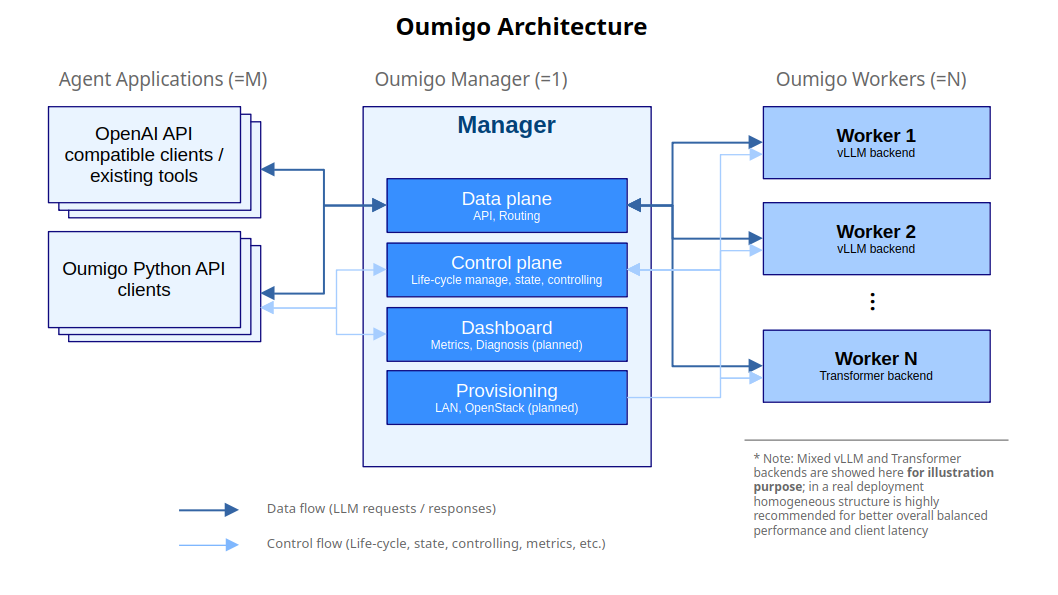
The manager is internally divided into layers by responsibility. The control plane tracks worker registration and state, and drives their lifecycle. The data plane takes incoming requests and forwards inference calls to the workers.
A worker runs a long-lived coordinator that starts and supervises the LLM server process. Each worker registers itself with the manager and keeps reporting its health.
The manager also has a dashboard layer for performance monitoring, and a provisioning layer that is responsible for how workers are started (planned).
Key capabilities
- Fleet lifecycle management: start and stop multiple GPU instances dynamically. Both the vLLM and Transformers backends are supported.
- Unified routing: the data interface and the control interface are consolidated into one, and requests are dispatched to healthy workers at runtime.
- OpenAI-compatible API:
/v1/chat/completions,/v1/completions,/v1/models, and SSE streaming. - Python API:
Agent(tools)→Chat→request, providing a built-in agent loop, tool calling, response parity between streaming and non-streaming, and access to reasoning content. - Guardrails: an interceptor chain at the agent layer. With the
Guardprotocol as a narrow waist, extensions from rule-based to model-based can be written without touching the internals of the fleet. - Performance monitoring: metrics collection and diagnostics across the fleet.
Works with your existing code
Because the data plane speaks the OpenAI API, any tool that supports an OpenAI-compatible Web API connects as-is, with no additional development. Point it at the manager’s router and the whole fleet appears as a single URL endpoint. That is what lets it work with many general-purpose agent packages at no extra effort.
Base URL:  http://<manager-host>:<router-port>/v1
Model:     a model ID from GET /v1/models
API key:   any non-empty string (the data plane does not check it)
With the openai Python client, for example, only the connection target changes.
from openai import OpenAI

client = OpenAI(
    base_url="http://<manager-host>:<router-port>/v1",
    api_key="oumigo",          # any non-empty string
)

response = client.chat.completions.create(
    model="<a model ID from GET /v1/models>",
    messages=[{"role": "user", "content": "Hello"}],
)
print(response.choices[0].message.content)
This has also been verified with editing and coding assistant agents; any OpenAI API SDK or tool works the same way.
Quickstart
Oumigo is published on PyPI. Install the extra that matches the node’s role.
$ pip install "oumigo[manager]"    # on the manager box
$ pip install "oumigo[worker]"     # on a GPU worker box (vLLM + Transformers)
$ oumigo version
On a GPU worker box, do not install torch separately — vLLM pins its version and pulls the matching CUDA wheel transitively.
See the repository documentation for details.
- docs/api.md — Python API: agent loop, chat, tool calls, streaming
- docs/metrics.md — performance monitoring and metrics
- docs/worker-node-states.md — the worker node state machine
Current status
| Item | Details |
|---|---|
| Provider | GotoAI Inc. |
| Version | v0.2.0 |
| License | MIT (open source) |
| Backends | vLLM, Transformers |
| Supported LLMs | Any LLM supported by vLLM or Hugging Face. Nearly every major open-weight model can be run. – vLLM supported models: https://docs.vllm.ai/en/latest/models/supported_models/ – Hugging Face models: https://huggingface.co/models |
| Server configuration | StaticProvider (LAN. Workers are started by hand and self-register.) |
| Planned | Cloud environments such as ConoHa and OpenStack, added as implementations of the same Provider protocol |
Provisioning today is limited to StaticProvider — GPU machines brought up by hand on a local LAN. An implementation that acquires workers automatically in the cloud will be added on top of the same Provider protocol.
Repository
The source code, documentation and issue tracker all live in the repository. Feedback and bug reports are welcome.
- github.com/gotoai/oumigo — source code and documentation
- Issues — bug reports and feature requests
- PyPI — package distribution